Sales invoice example: what it looks like and how to create one
September 14, 2026 · 11 min read · By Charles Ugo
invoice
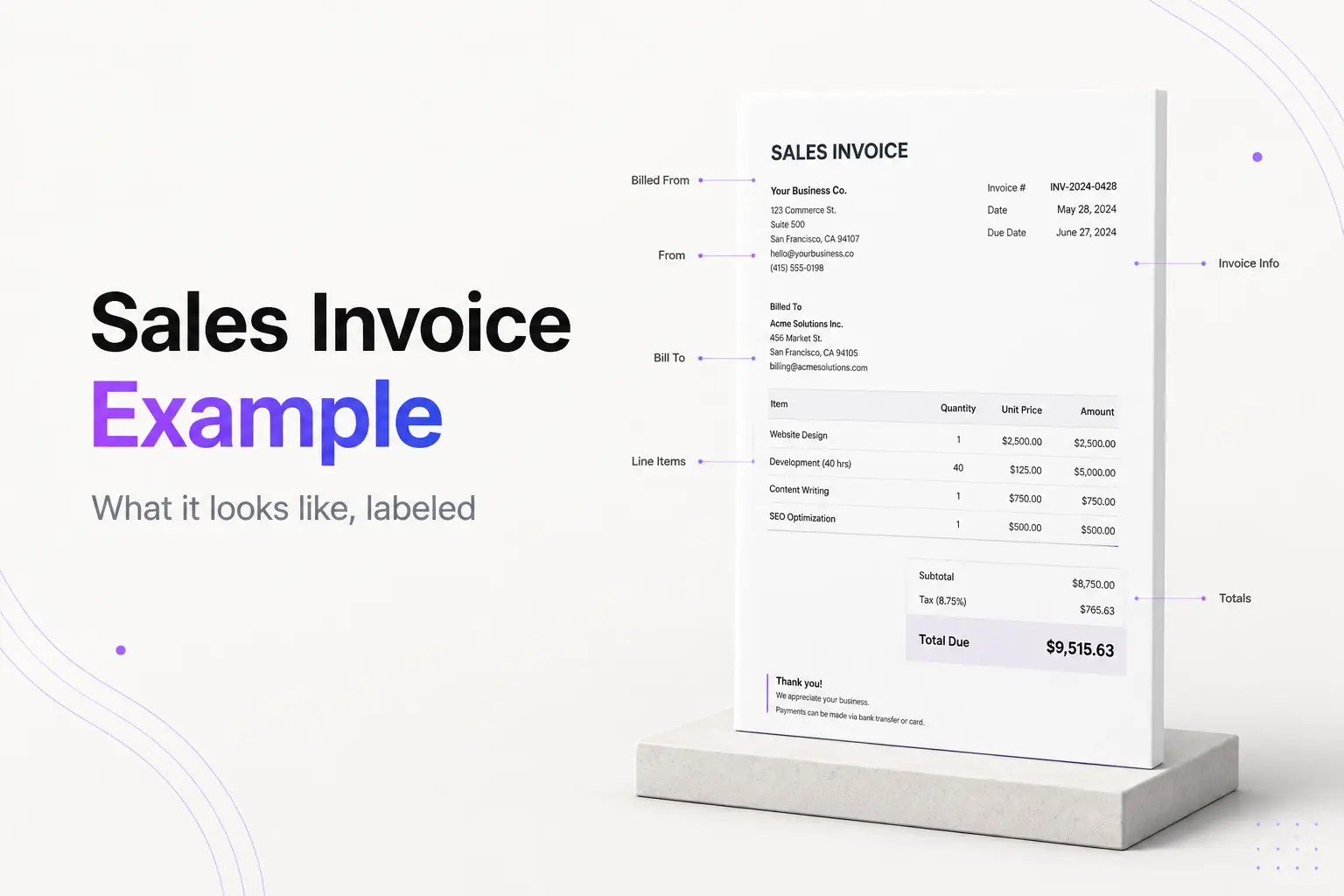
A sales invoice is the document a seller sends to a buyer to request payment for goods or services that were sold. It lists what was sold, the price, the total owed, and how to pay. The fastest way to understand one is to see it, so this guide gives you a fully labeled sales invoice example, then two copy-ready samples—one for a product sale and one for a service sale—you can adapt today.
If you want to fill one in and download a PDF right now, the invoicepdf.io invoice generator walks you through every field with no account needed. Come back here for the labeled example and the samples.
What a sales invoice is (and what makes it a "sales" invoice)
A "sales invoice" is just an invoice named from the seller's point of view. The word "sales" only signals which side of the deal you are on: you sold something, and this is your request to be paid for it. The buyer who receives the very same document files it as a purchase invoice, because for them it records an expense. Same paper, two names.
That framing matters for one practical reason: a sales invoice is how you record revenue and track what customers still owe you (your accounts receivable). Send it, log it, and follow up on it—that loop is the point.
Two documents get confused with a sales invoice:
- A sales receipt. A receipt confirms payment after the money arrives. A sales invoice asks for payment before it does. If you were paid on the spot, you issue a receipt, not an invoice.
- A purchase order. A purchase order comes from the buyer before the work, to authorize the order. The sales invoice comes from you after, to collect on it.
Keep a copy of every sales invoice you send. The IRS expects small businesses to keep records that support the income they report, and sent invoices are exactly those records. (General information, not tax advice.)
The anatomy of a sales invoice
Every sales invoice is built from the same parts. Here is what each one is and why it earns its place on the page.
| Field | What it is | Why it matters |
|---|---|---|
| Your business + contact | Name, address, email, phone | Tells the buyer who to pay and how to reach you |
| "Bill To" block | Buyer's name and address | Ties the invoice to the right payer for their records |
| Invoice number | A unique reference, e.g. INV-1042 | Lets both sides track and match payments; never reuse one |
| Invoice date | The day you issued it | Payment terms are counted from this date |
| Due date | A specific calendar date | Removes any doubt about when payment is expected |
| Itemized lines | One row per item: description, qty, unit price, line total | Shows exactly what the buyer is paying for |
| Subtotal | Sum of the line totals before tax | The base the tax and discount lines act on |
| Sales tax | A tax line, only if the sale is taxable | Many services are not taxed; depends on your state |
| Total due | The single bold number owed | The figure the buyer looks for first |
| Payment terms + instructions | How and when to pay | Turns the invoice into an action the buyer can complete |
A note on the invoice number: give every invoice a fresh, unique one, and never reuse a number—even for an invoice you voided. Duplicates corrupt your records and confuse buyers. If you are starting a numbering system, see what an invoice number is.
A note on sales tax: whether you add a tax line depends on your state and what you sold. Many services are not taxable, and the US does not require one federal invoice format—the fields above are practical convention, not a legal mandate. Check your own state's rules before adding tax. (General information, not tax advice.)
You also do not need a registered company to send one. A sole proprietor can invoice under their own legal name, and you should not put your Social Security number on an invoice.
A labeled sales invoice example
Here is a complete sales invoice with every zone marked, so you can see where each field sits on the page.
────────────────────────────────────────────────────────
[ HEADER ]                                    INVOICE
Bright Wax Candle Co.                    Invoice #: INV-1042
128 Cedar Lane, Austin, TX 78701         Date: Sep 14, 2026
hello@brightwax.example                  Due:  Sep 29, 2026
(512) 555-0142                           Terms: Net 15
────────────────────────────────────────────────────────
[ BILL TO ]
The Fern Shop
12 Market St, Portland, OR 97204
orders@fernshop.example
────────────────────────────────────────────────────────
[ LINE ITEMS ]
Description                     Qty   Unit price   Line total
8oz soy candle — Cedar          24      $9.00        $216.00
8oz soy candle — Citrus         18      $9.00        $162.00
Gift set (3-pack)                6     $22.00        $132.00
────────────────────────────────────────────────────────
[ TOTALS ]
                                 Subtotal            $510.00
                                 Wholesale disc. 10% −$51.00
                                 TOTAL DUE           $459.00
────────────────────────────────────────────────────────
[ PAYMENT ]
Pay via bank transfer (details below) or card link.
Thank you for your order!
────────────────────────────────────────────────────────
Read it top to bottom and the logic is clear: who is billing (header), who is being billed (Bill To), what was sold (line items), what is owed (totals), and how to pay (payment). Every sales invoice you ever see is a variation on those five zones. For a broader look at layout, see what an invoice looks like.
Example 1: Product sale (retail, with sales tax)
Use this shape when you sell physical goods. Quantity and unit price do the work, and a tax line is more often in play than with services.
Scenario: A stationery maker sells a bulk order to a local cafe.
| SKU | Description | Qty | Unit price | Line total |
|---|---|---|---|---|
| PC-200 | Kraft menu cards, A5 | 200 | $0.85 | $170.00 |
| PC-210 | Table tent cards | 40 | $1.50 | $60.00 |
| PC-305 | Custom stamp | 1 | $35.00 | $35.00 |
| Subtotal | $265.00 | |||
| Sales tax (TX 8.25%) | $21.86 | |||
| Total due | $286.86 |
Invoice #INV-2044
Issued: Sep 14, 2026   Due: Sep 24, 2026 (Net 10)
Bill To: Blue Door Cafe, 90 Guadalupe St, Austin, TX 78701
Pay via: bank transfer or card. Goods ship on payment.
Why it works: each product is its own line, so the cafe can reconcile the delivery against the invoice. The tax line sits on the taxable subtotal, and the total due is the one bold number to pay.
Example 2: Service sale (flat fee, no tax)
Use this shape when you sold your work rather than a product. The lines describe deliverables, and many services carry no sales tax.
Scenario: A freelance web designer bills a client for a finished project.
| Description | Qty | Rate | Line total |
|---|---|---|---|
| Landing-page design — 2 concepts | 1 | $900.00 | $900.00 |
| Mobile layout + handoff files | 1 | $350.00 | $350.00 |
| Revision round (agreed scope) | 1 | $150.00 | $150.00 |
| Subtotal | $1,400.00 | ||
| Total due | $1,400.00 |
Invoice #INV-1189
Issued: Sep 14, 2026   Due: Oct 14, 2026 (Net 30)
Bill To: Northwind Coffee, 88 Harbor Ave, Seattle, WA 98101
Terms: Net 30. Please reference INV-1189 on payment.
Pay via: ACH transfer or card link below.
Why it works: the deliverables read as plain outcomes the client recognizes, there is no tax line because the service is not taxable in this case, and "Net 30" is backed by a real due date. Not sure what Net 30 means? See what Net 30 means on an invoice. For deeper line-item help, see the itemized invoice guide.
How to create a sales invoice in five steps
- Add your header. Business name, address, email, and phone at the top so the buyer knows who to pay.
- Fill the Bill To block. The buyer's exact name and address, so the invoice lands with the right payer.
- Number and date it. Assign the next unique invoice number, set the invoice date, and set a specific due date—not just "Net 30."
- Itemize the sale. One line per product or deliverable with quantity, unit price, and line total. Add the subtotal, a sales-tax line only if the sale is taxable, and any discount. End with the bold total due.
- Add payment instructions and send. State how to pay and by when, then send it the same day the sale closes.
The invoicepdf.io generator turns those five steps into a clean PDF in the browser, no sign-up. Prefer a reusable file you edit each time? Start from a free invoice template for Google Docs or an Excel invoice template and adapt it per sale.
Common mistakes to avoid
- No specific due date. "Net 30" is a term, not a date. Write the calendar day so payment timing is not up for debate.
- Reusing an invoice number. Every invoice gets a fresh, unique number—even one you voided. Duplicates wreck your records.
- Vague line items. "Services — $1,400" invites questions. Named, itemized lines get paid faster.
- Assuming you must add sales tax. Tax is state- and product-dependent, and many services are not taxed. Check before adding a tax line.
- Treating the invoice as a receipt. An invoice asks for payment; a receipt proves it was paid. See invoice vs. receipt if the terms blur.
- Sending late. Invoice the day the sale closes. Every day you wait is a day later you get paid.
One related document worth naming: a commercial invoice, used when goods cross a border. It carries extra fields for customs and its format is set by trade authorities, not by you—see the commercial invoice guidance from trade.gov and our own commercial invoice guide.
Build your sales invoice now
Pick the example that matches how you sell—product or service—copy its structure, and swap in your own details. The invoicepdf.io invoice generator turns those fields into a downloadable PDF for free, and you can browse ready-made templates if you want a starting layout.
Whatever you use, keep the five zones in mind: a clear header, the Bill To block, itemized lines, one bold total, and payment instructions. Get those right and your sales invoice does its only job—getting you paid.
Frequently Asked Questions
What is a sales invoice?
A sales invoice is a document the seller sends to the buyer to request payment for goods or services that were sold. It lists what was sold, the quantities and prices, the total amount due, and how and when to pay. The seller uses it to record revenue and track money owed.
What is an example of a sales invoice?
A candle maker sells 24 candles at $9 each to a shop. The sales invoice shows the seller's name and contact details, the buyer under "Bill To," invoice #INV-1042 dated Sep 14 2026, one line reading "8oz soy candle — 24 × $9.00 = $216.00," a subtotal, a sales-tax line if the sale is taxable, and a bold total due with a Net 15 due date and payment instructions.
What is the difference between a sales invoice and a purchase invoice?
It is the same document seen from two sides. The seller issues it and calls it a sales invoice because it records a sale and money coming in. The buyer receives that exact document and files it as a purchase invoice because it records an expense and money going out. See purchase order vs. invoice for how these documents relate.
Is a sales invoice the same as a receipt?
No. A sales invoice requests payment before the money is paid. A receipt confirms payment after it has been received. One asks for money owed; the other proves the money was paid. See invoice vs. receipt for the full comparison.
What should a sales invoice include?
Your business name and contact details, the buyer's details under "Bill To," a unique invoice number, the invoice date and due date, itemized lines with quantity and price, a subtotal, any sales tax or discount, the total due, and payment instructions.
Do I need a registered business to send a sales invoice?
No. A sole proprietor can invoice under their own legal name with no LLC or company registration. You do not need to put a Social Security number or EIN on the invoice for it to be valid.